
Overview: This deep-dive explains how operating systems and virtualization work from the hardware level upward. It covers how a CPU executes processes, how memory is virtualized using paging, and how user mode and kernel mode enforce protection and isolation. It extends these concepts to virtualization, showing how hypervisors create virtual machines by multiplexing CPU, memory, and I/O using hardware support such as Intel VT-x and AMD-V.
1. OS Recap: What is a Process?
Definition (core idea): A process is an executing instance of a program: it bundles an address space (code + data + stack), CPU context (registers, PC), OS resources (open files, sockets), and metadata (PID, owner, scheduling priority).
CPU Reality: CPU can only execute machine instructions. Everything else (files, windows, networks) is just abstractions.
Process Equation: Process = Code + Data + Heap + Stack + CPU context + OS resources.
Executable: Machine code.
OS: Allocates memory image, creates PCB, loads program, manages execution.
Virtualization: Creates a fake machine on which a real OS creates real processes.
Understanding process internals is the foundation of hypervisors, VMs, containers, and cloud systems.
Key Structures & Mechanisms
- Process Control Block (PCB): PID, registers, program counter, state, open file descriptors, memory map, parent/children, credentials.
- Address Space Layout: text (code), data (heap), BSS, stack, mapped files.
- States: New → Ready → Running → Waiting (I/O) → Terminated.
- Context Switch: OS saves current PCB (registers, PC) and loads destination PCB. Cost: register save/restore, TLB flushs (maybe), cache effects.
- Fork/Exec (UNIX): fork() duplicates process (copy-on-write optimizations), exec() replaces address space.
Analogy: The Virtual Office
Virtual Memory (The Desk): Imagine a worker (Process) with a desk that seems infinitely long and clean. They just reach for items. This is the “Virtual Address Space”.
Physical Memory (The Warehouse): In reality, items are stored in boxes in a chaotic warehouse. The worker doesn’t see this complexity.
Page Table (The Index Book): Maps “Item on Desk” to “Box #42 in Warehouse”.
TLB (Sticky Notes): Quick notes for frequently used items to avoid looking up the big index book every time.
Page Fault: If an item isn’t on the desk or nearby, work stops (Fault) until support staff brings it from long-term storage.
2. Types of Hypervisors
Type 1 Hypervisor (Bare-Metal)
Runs directly on physical hardware without an intermediate host operating system. It provides a minimal, high-performance control layer.
- Core Characteristics: Installed on bare-metal, no host OS, optimized for security, scalability, and performance.
- Common Implementations: VMware ESXi, Microsoft Hyper-V, KVM, Xen.
- Use Cases: Enterprise data centers, Public Cloud (AWS Nitro, Azure, GCP).
- Why Cloud? Near bare-metal performance, strong tenant isolation, support for hardware virtualization extensions (Intel VT-x, AMD-V).
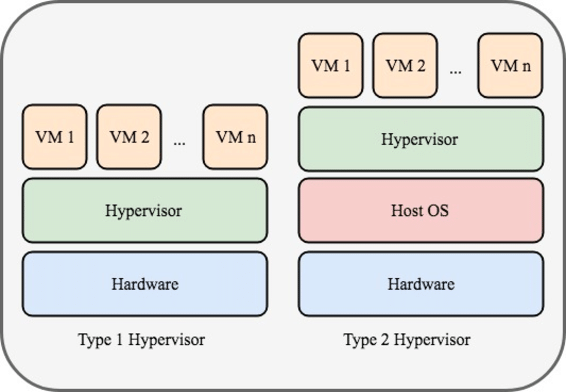
Type 2 Hypervisor (Hosted)
Runs as an application on top of an existing host OS (like Windows or macOS). Relies on the host for hardware management.
- Core Characteristics: Installed on top of Host OS, hardware access mediated by host, optimized for convenience.
- Common Implementations: Oracle VirtualBox, VMware Workstation, Parallels Desktop.
- Use Cases: Local development, learning/experimentation, application compatibility.
3. Virtual Memory & Paging
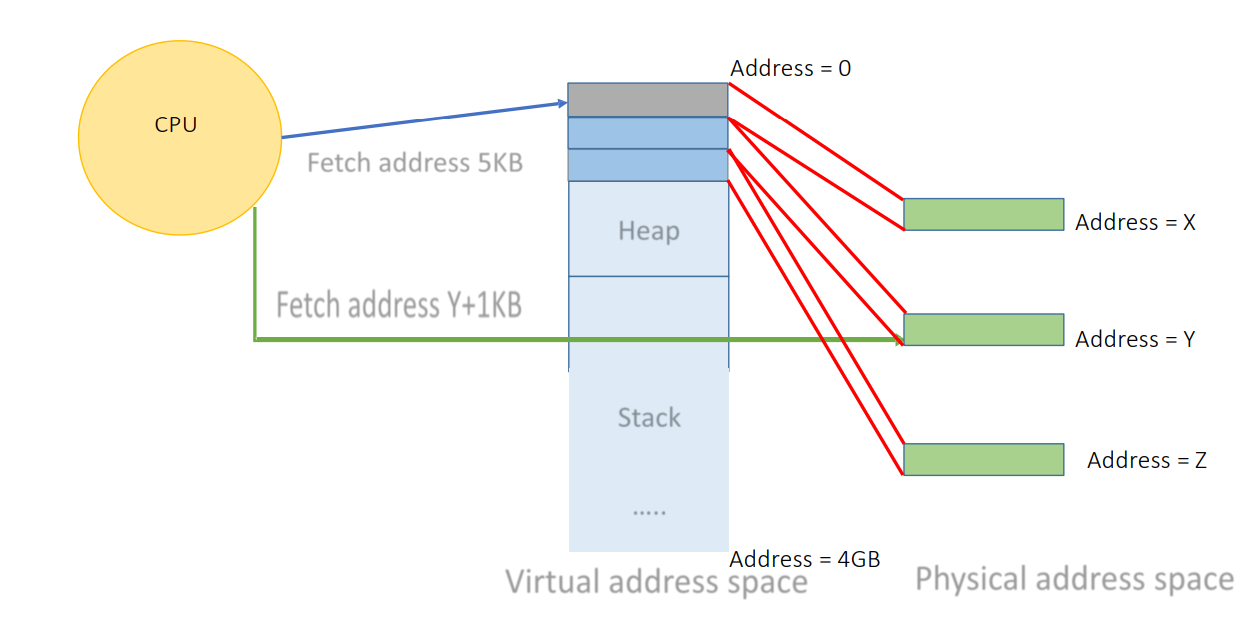
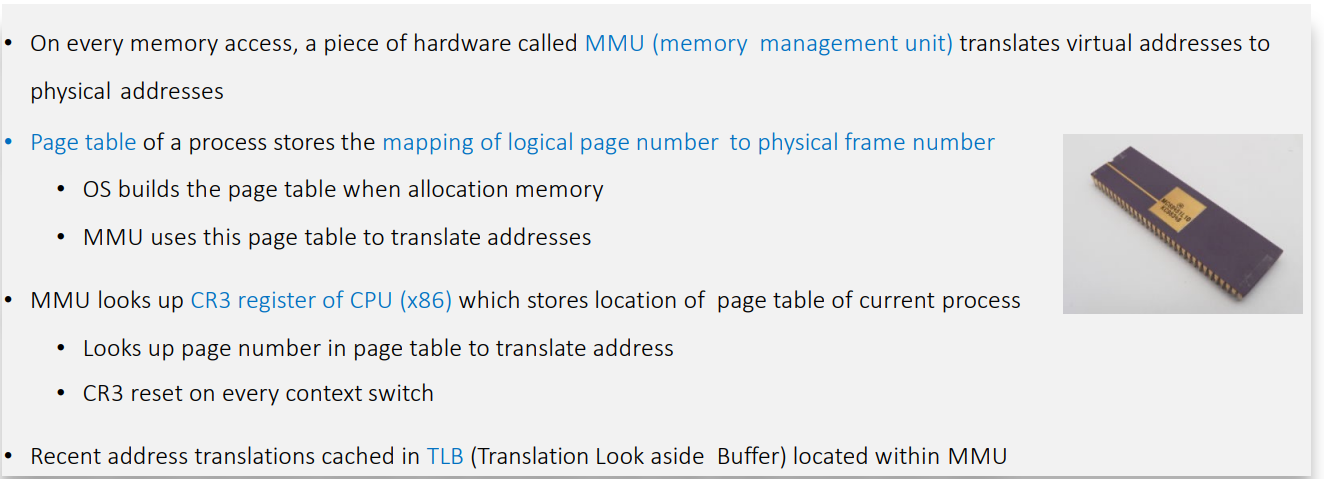
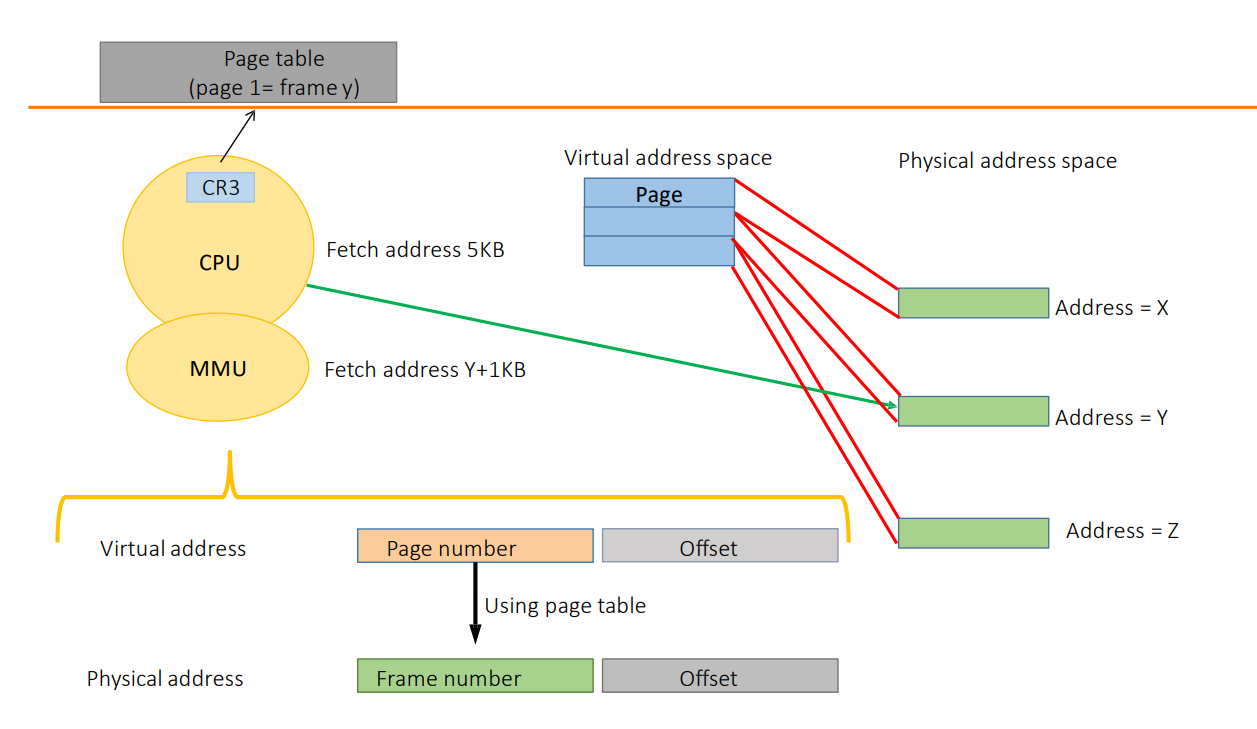
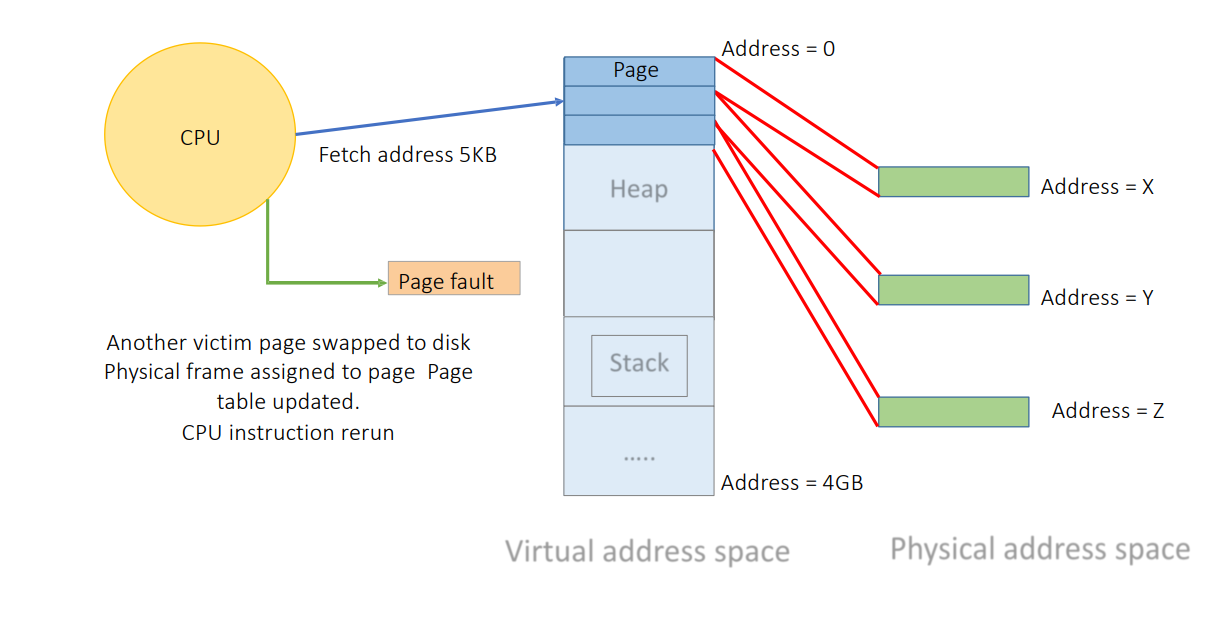
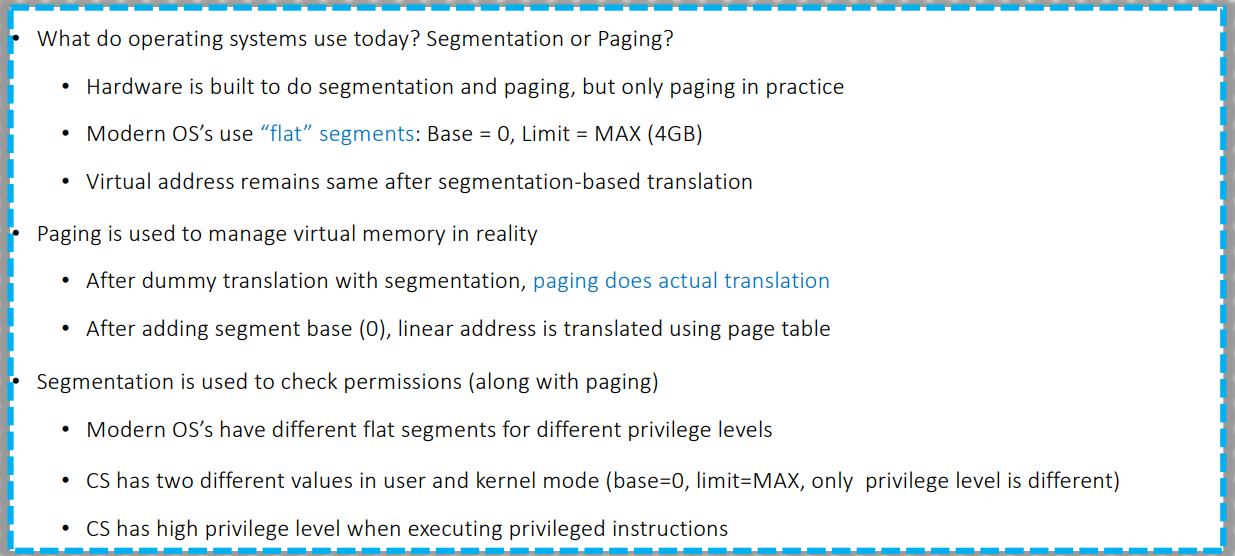
Virtual memory provides each process with a private, contiguous address space while the OS/MMU transparently maps virtual addresses to physical memory using paging structures.
- Pages: Memory is divided into fixed-size blocks (usually 4KB).
- Page Tables: Hierarchical data structures map virtual addresses to physical frames.
- TLB (Translation Lookaside Buffer): Hardware cache for fast address translation.
- Page Faults: Occur when accessing unmapped memory, handled by kernel (allocating or loading from disk).
Virtualization Considerations
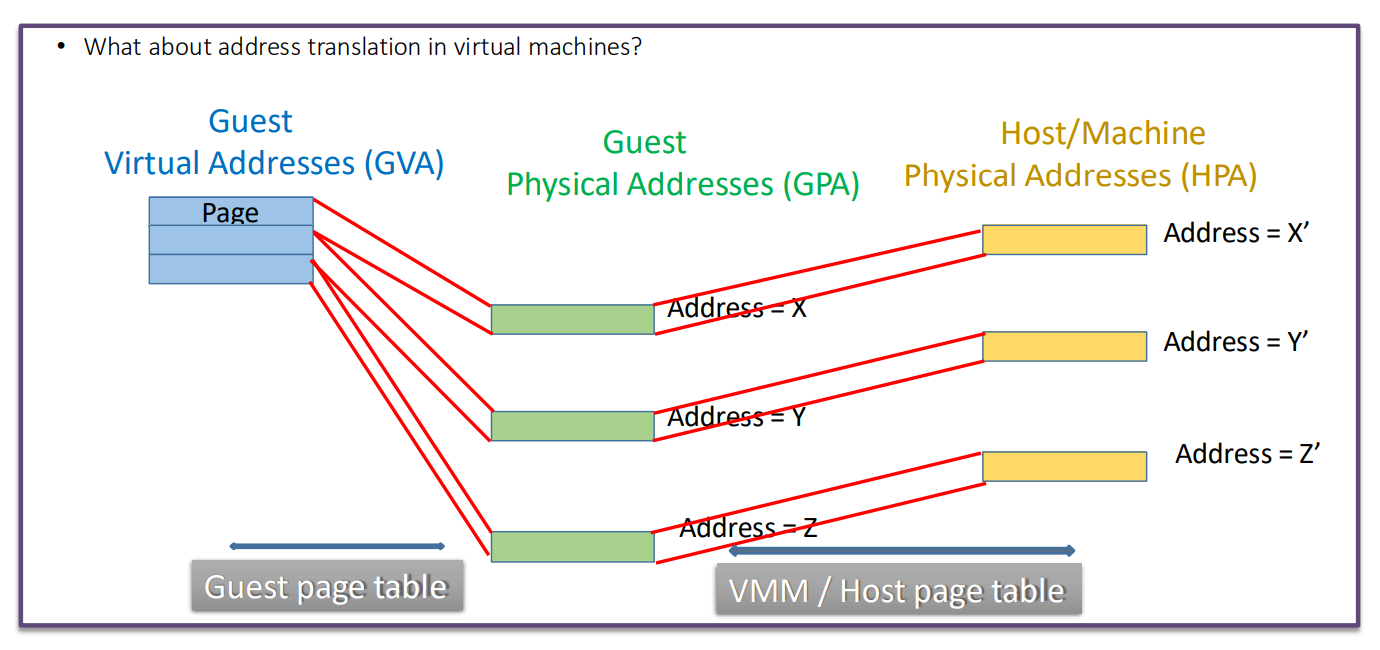
- Two-Level Address Translation: Guest Virtual Address (GVA) → Guest Physical Address (GPA) → Host Physical Address (HPA).
- Hardware-Assisted Nested Paging: EPT (Intel) and NPT (AMD) allow the MMU to perform both translation stages in hardware, improving performance.
4. User Mode vs. Kernel Mode
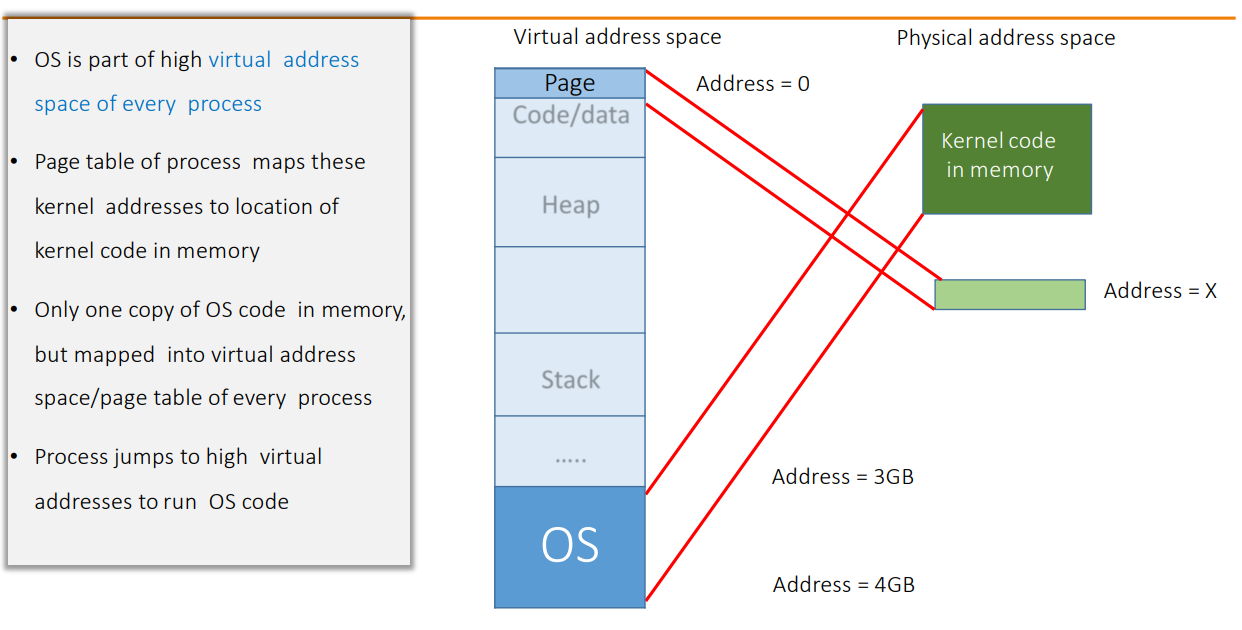
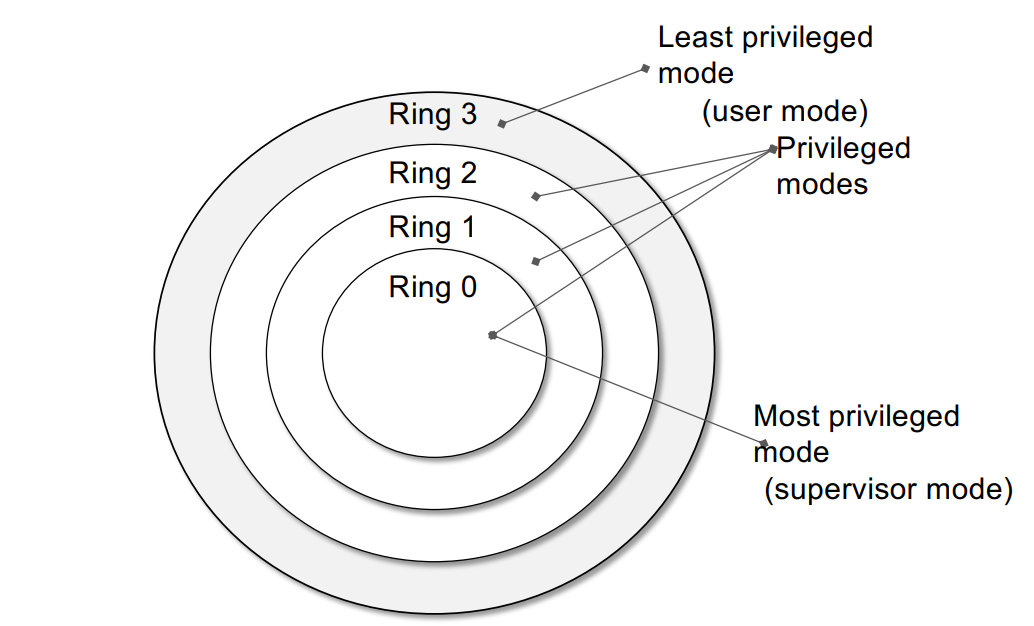
Modern CPUs enforce multiple privilege levels (rings) to separate user applications from the OS kernel.
- User Mode (Ring 3): Unprivileged. Restricted instruction set. No direct hardware access.
- Kernel Mode (Ring 0): Privileged. Full access to hardware, memory, and system resources.
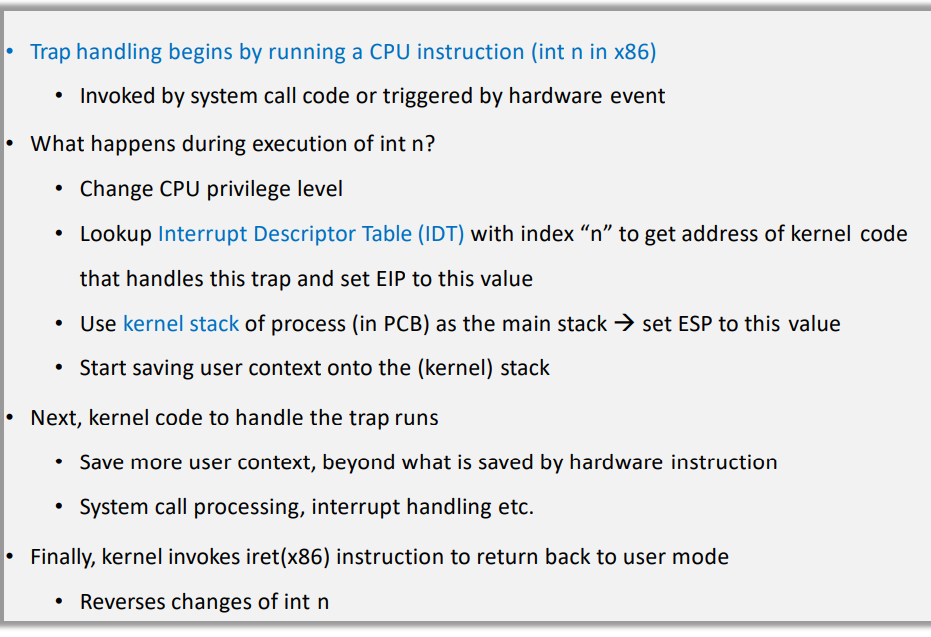
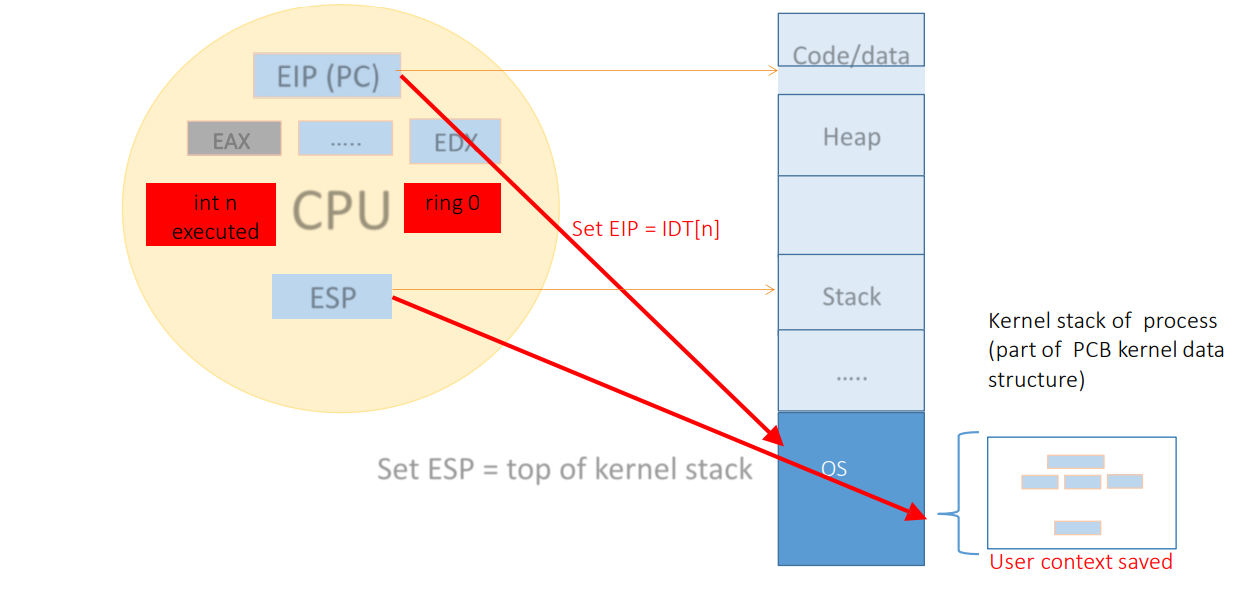
The Trap: Transitions from user to kernel mode happen via System Calls, Faults, or Interrupts. The CPU switches privilege levels, jumps to the OS handler, and then returns.
5. Interrupt and Trap Handling in Virtualized Systems
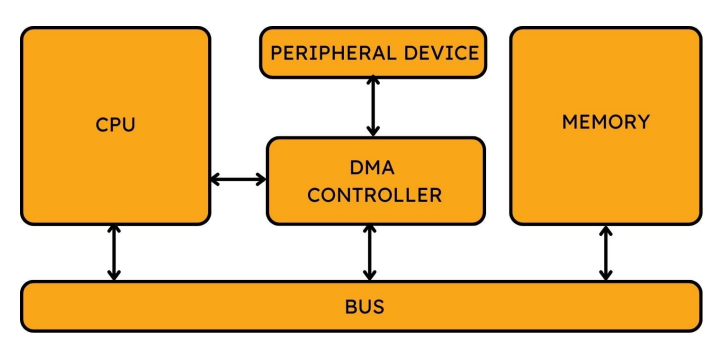
Interrupts (Asynchronous): Hardware events (timer, network) independent of the current
instruction.
Traps (Synchronous): Caused by the instruction itself (system call, page fault, divide by
zero).
Virtualization-Specific Design
- Trap-and-Emulate: Privileged instructions in guest cause “VM Exits” to the hypervisor. Expensive.
- Interrupt Virtualization: Hypervisor injects virtual interrupts into the Guest VM.
- Paravirtualization: Guest OS is modified to use “Hypercalls” instead of sensitive instructions, reducing overhead.


Analogy: Interrupts & Traps
Interrupt (Phone Ringing): You are working. The phone rings (external event). You pause, place a bookmark, answer, then resume.
Trap (Mistake/Help): You make a calculation error or need approval. You stop work and go to the supervisor (Kernel) to fix it.
6. The Computing Stack & VMM
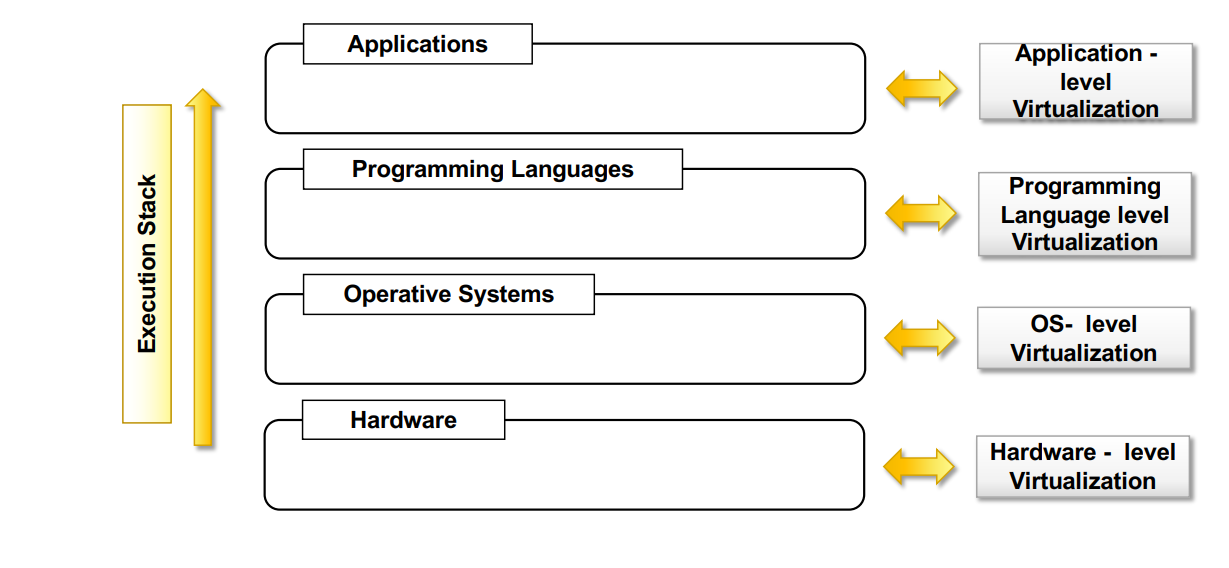
The Stack
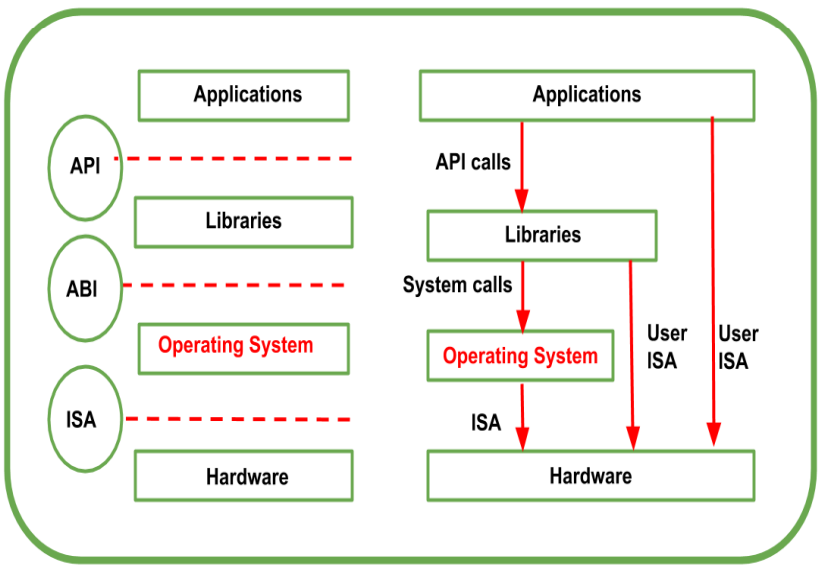
- API: Interfaces apps to libs/OS.
- ABI: Separates OS layer from apps (System Calls).
- ISA: Instruction Set Architecture (Hardware interface).
VMM (Virtual Machine Monitor) & Popek Goldberg Theorem
Theorem: To build a VMM efficiently via trap-and-emulate, sensitive instructions must be a subset of privileged instructions.
x86 Issue: Historically, x86 did not satisfy this (some sensitive instructions didn’t trap), making pure trap-and-emulate impossible.
Techniques to Virtualize x86
- Paravirtualization (e.g., Xen): Rewrite Guest OS to use Hypercalls. High performance, requires modified OS.
- Full Virtualization (e.g., VMware): Binary translation of non-virtualizable instructions. Works with unmodified OS but higher overhead.
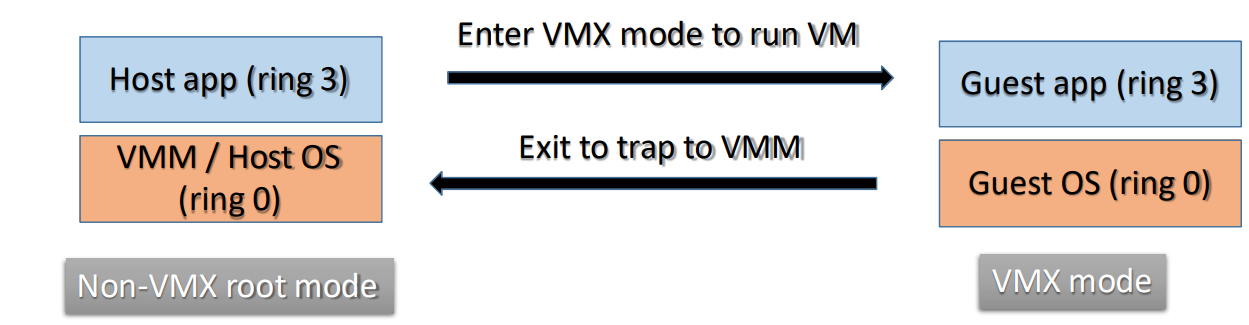
- Hardware Assisted (e.g., KVM/QEMU): CPU adds VMX mode (Root/Non-Root). Guest runs in Non-Root Ring 0. Hypervisor runs in Root Mode.
7. Popular Virtualization Technologies Comparison
| Technology | Type | Primary Use | Unique Features |
|---|---|---|---|
| VMware ESXi | Type 1 | Enterprise | Mature, vMotion, HA. |
| Microsoft Hyper-V | Type 1 | Azure/Windows | Deep Windows integration. |
| AWS Nitro | Type 1 (Light) | AWS EC2 | Offloads virtualization to hardware cards. |
| KVM | Type 1 (Kernel) | Linux/Cloud | Built into Linux, open-source. |
| Docker | Container | App Deployment | Shares host kernel, fast startup. |
| Kubernetes | Orchestrator | Cloud Native | Automated scaling/healing. |
| Firecracker | MicroVM | Serverless | Secure like VM, fast like container. |