
1. Microsoft 365 – Platform-Level Understanding
1.1 What Microsoft 365 Really Is (Beyond Marketing)
Microsoft 365 is not a single product. It is a federated SaaS platform composed of multiple interconnected layers:
| Layer | Purpose | Examples |
|---|---|---|
| Identity Layer | Authentication & authorization | Azure AD (Entra ID) |
| Messaging Layer | Email, calendaring, transport | Exchange Online |
| Collaboration Layer | Files, intranet, teams | SharePoint Online, OneDrive |
| Communication Layer | Chat, meetings | Microsoft Teams |
| Security & Compliance | Protection, governance | EOP, Defender, Purview |
| Management Layer | Control plane | Admin Centers, PowerShell |
2. Exchange Online – Conceptual Architecture
2.1 Exchange Online vs Exchange Server (High-Level)
| Area | Exchange Online | Exchange Server (On-Prem) |
|---|---|---|
| Ownership | Microsoft | Customer |
| Patching | Automatic | Manual |
| Scalability | Elastic | Hardware-bound |
| Availability | Microsoft SLA | Customer responsibility |
| Security baseline | Default hardened | Must be designed |
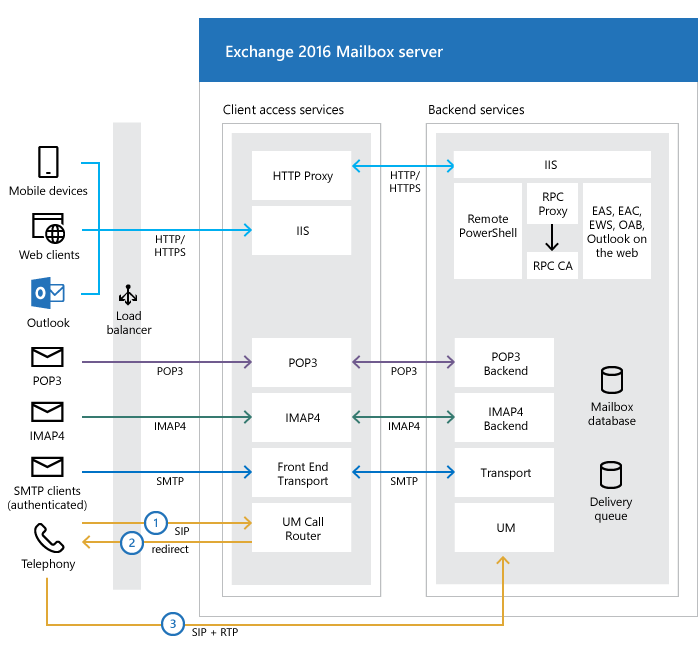
2.2 Logical Architecture of Exchange Online
- Multi-tenant architecture: Tenants are logically isolated, not physically.
- Geo-distributed: Mailbox databases are distributed for redundancy.
- Protection: Transport is front-door protected by Exchange Online Protection (EOP).
- Identity-driven: All access is verified via Azure AD.
3. Core Exchange Online Components
3.1 Identity Dependency (Critical)
Exchange Online does nothing without identity. Users authenticate via Azure AD, and mailboxes are simply attributes of user objects. Supported identity models include Cloud-only, Hybrid (AAD Connect), and Federated (legacy).
3.2 Exchange Online Protection (EOP)
EOP sits in front of Exchange Online, providing inbound spam filtering, malware scanning, connection filtering, and policy enforcement. Mail flow never directly hits mailbox servers.
4. Mailbox Types – Deep Dive
This area is often misdesigned. Understanding the correct mailbox type is critical for licensing and compliance.
4.1 User Mailbox
Tied to a licensed Azure AD user. Used for humans sending/receiving mail. Supports archive and litigation hold.
4.2 Shared Mailbox
Not intended for direct login. Used for generic addresses like info@company.com. Requires no license (up to 50GB) and is accessed via delegation.
4.3 Resource Mailboxes
- Room Mailbox: Represents physical meeting rooms. Supports booking policies.
- Equipment Mailbox: Represents shared resources (projectors, vehicles).
4.4 Mail User vs. Mail Contact
| Feature | Mail User | Mail Contact |
|---|---|---|
| Azure AD account | Yes | No |
| Login possible | Yes | No |
| External email | Yes | Yes |
| Use Case | Hybrid/Routing | External Vendors/DLs |
5. Licensing & Management
Exchange is license-driven. Design decisions must precede licensing choices (e.g., Plan 1 vs Plan 2, E3 vs E5). Management is performed via the Microsoft 365 Admin Center, Exchange Admin Center (EAC), and crucially, PowerShell.
6. Recap: On-Premise vs Cloud Architecture
1. What is Exchange Server?
Microsoft Exchange Server is an enterprise-grade messaging platform providing email, calendaring, contacts, and tasks. It integrates tightly with Active Directory.
Typical On-Prem Exchange Architecture
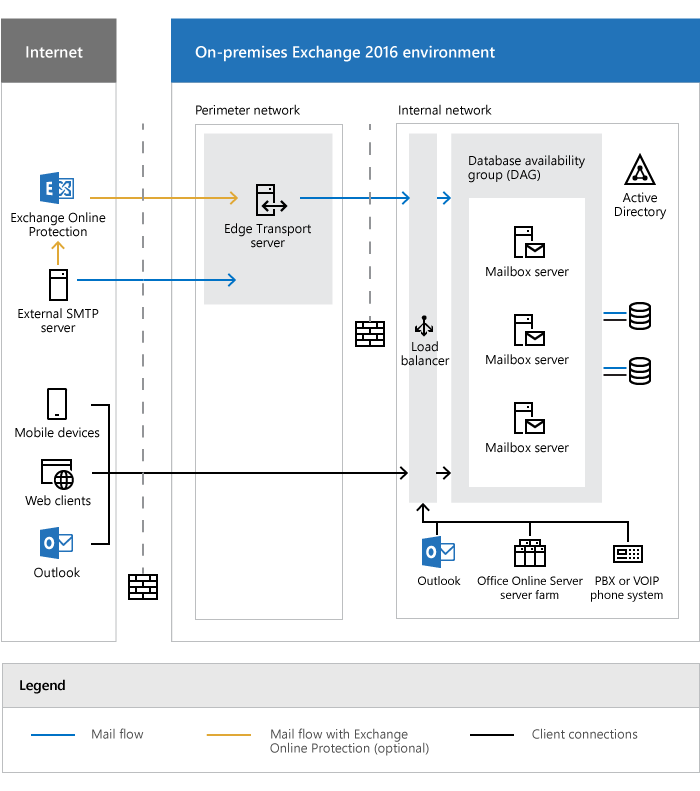
In on-prem access, everything is customer-managed: Hardware, OS, Patching, Backups, and Security.
2. Why Microsoft 365?
Organizations moved to SaaS to eliminate infrastructure challenges (hardware refresh, storage growth) and operational pains (patching downtime, complex upgrades).
Exchange Online Architecture
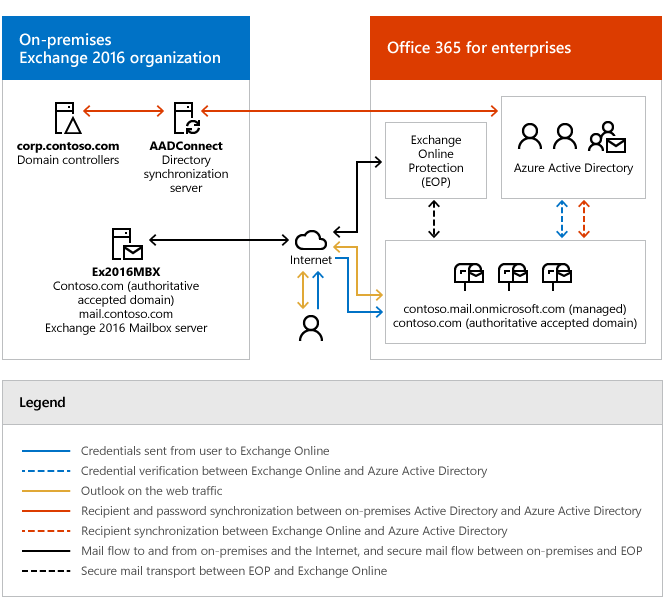
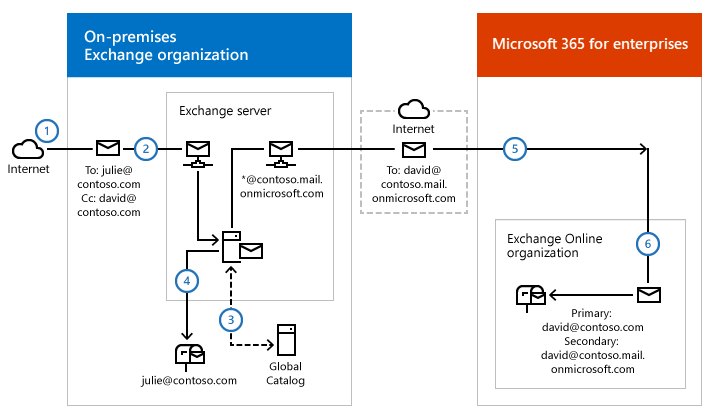
3. Hybrid Exchange
Hybrid Exchange is a coexistence model where some mailboxes remain on-prem and others are in the cloud. It is used for gradual migration, regulatory constraints, or legacy application support.
Summary for Architects
- Exchange Server started as on-prem infrastructure.
- Microsoft 365 solves scale, security, and agility issues.
- Exchange Online is SaaS, multi-tenant, and resilient.
- Hybrid is a strategic transition state, not a failure.