
Original Email System Analogy
The original email system is like an unsecured postcard where anyone could write any name in the “From” section, and the post office would deliver it without question. Modern protocols are like adding security features to that postcard after the fact:
• SPF is like the post office checking a list of approved couriers.
• DKIM is a tamper-evident wax seal on the message.
• DMARC is the final inspector ensuring the name on the seal matches the name written on the front.
• ARC is like a certified chain of custody log stamped onto the postcard by every intermediate post office that handles it. If the postcard is forwarded and the original seal (DKIM) must be broken to reroute it, the ARC stamps prove to the final recipient that the postcard was authentic when it first entered the system and has been handled by trusted intermediaries ever since
SPF (Sender Policy Framework):
What SPF Solves (Fundamental context)
SPF prevents unauthorized sending infrastructure from sending mail on behalf of your domain.
It answers:
“Is this sending IP allowed to send email for this domain?
Design Flow
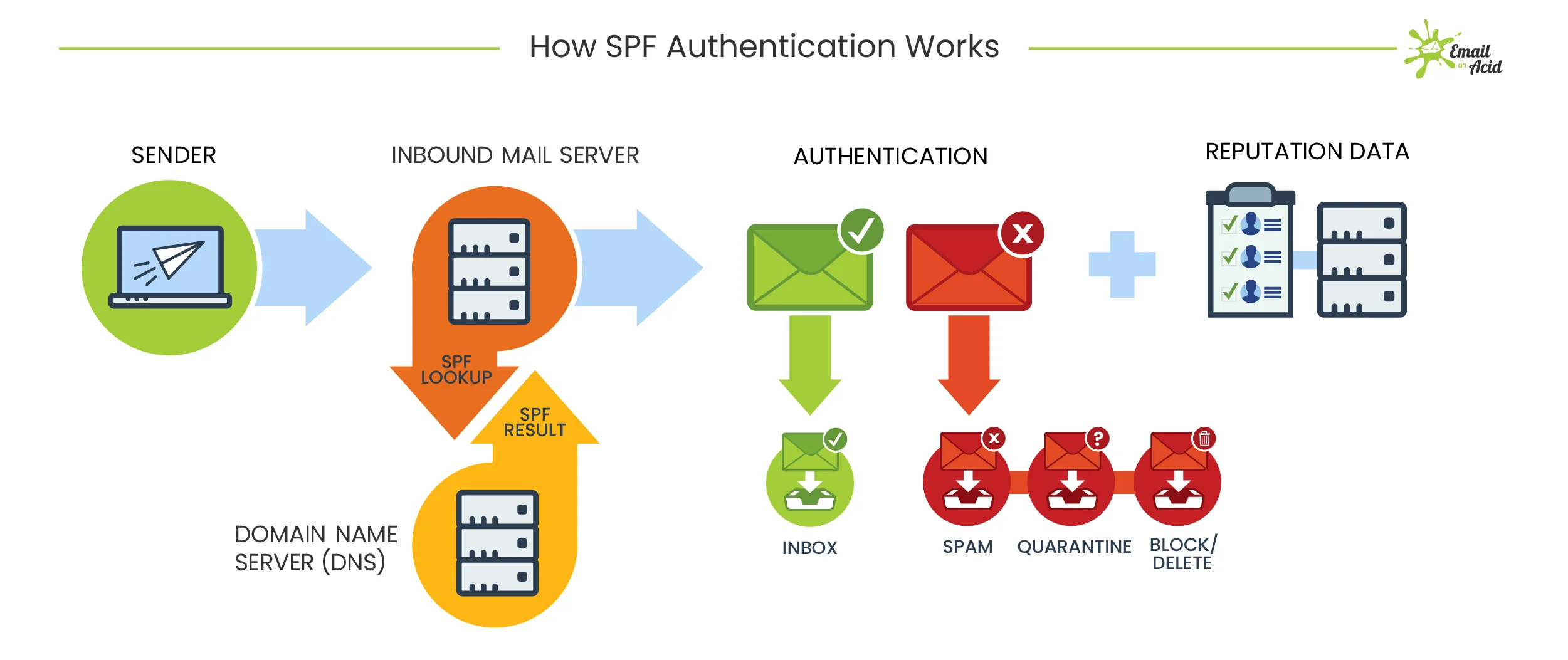
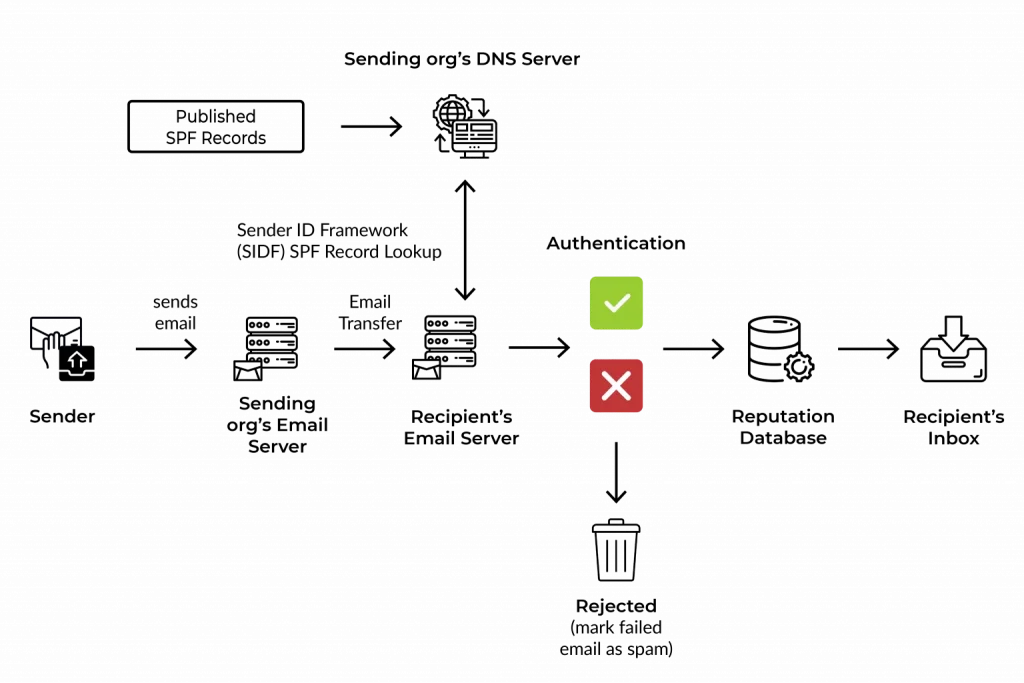
- Receiving MTA extracts MAIL FROM / Return-Path
- Queries DNS for SPF TXT record
- Compares sender IP against authorized IP mechanisms
- Returns result:
Pass | Fail | SoftFail | Neutral | None
Key Architectural Point
- SPF validates infrastructure identity
- It does not validate the visible From header
SPF Limitations (By Design)
- Breaks on forwarding
- DNS lookup limit (10)
- Does not protect display name spoofing
- Does not validate message integrity
Real Use Case
Think of SPF as a guest list at a building entrance.
If your name (IP) isn’t on the list, security flags you.
Real-world
- Prevents attackers from sending email “from your domain” using random servers
DKIM (DomainKeys Identified Mail)
What DKIM Solves
DKIM ensures message integrity and domain accountability using cryptography.
It answers:
“Was this message modified after it left the sender’s domain?”
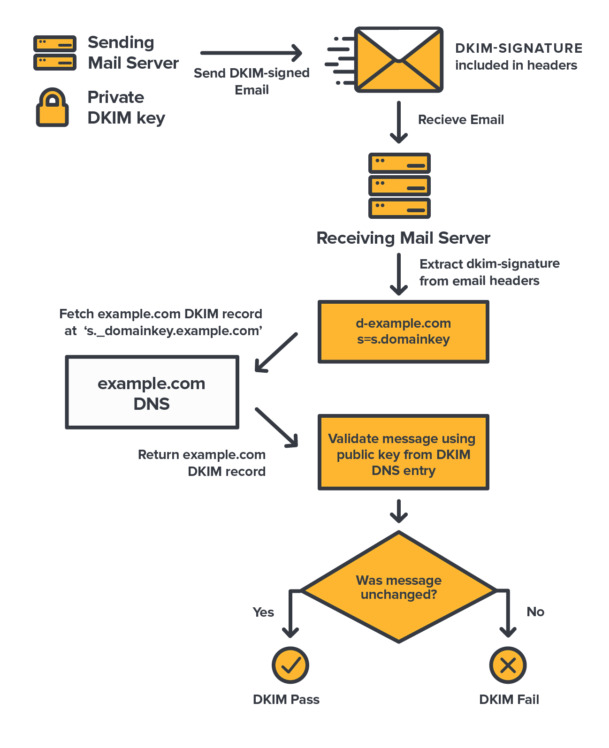
Design Flow
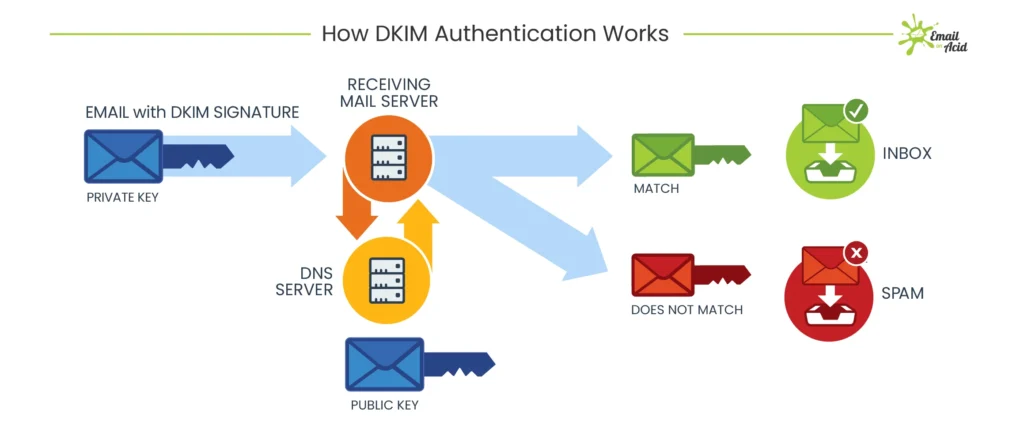
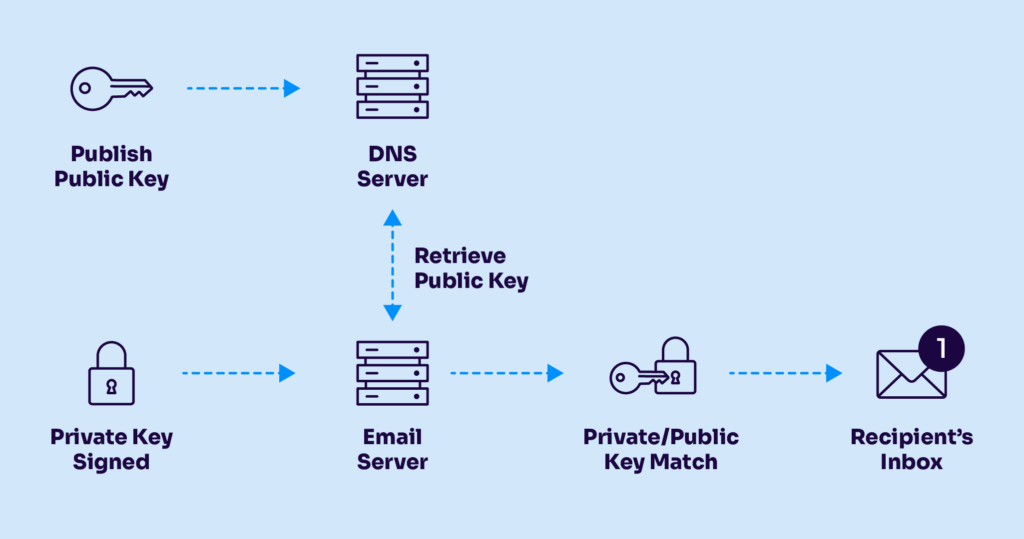
- Sending MTA hashes selected headers + body
- Hash is signed with private key
- Signature added to DKIM-Signature header
- Receiver retrieves public key from DNS using selector
- Recalculates hash and verifies signature
Critical Architectural Insight
- DKIM binds message content to sending domain
- Survives forwarding (if content not modified)
DKIM Limitations
- Body/header modification breaks DKIM
- Does not enforce policy by itself
- Alignment not mandatory without DMARC
Use Case
DKIM is like tamper-proof sealing wax on a letter.
If broken, the receiver knows someone altered it.
Real-world
- Ensures invoices, approvals, and legal emails are not modified in transit
DMARC (Domain-based Message Authentication, Reporting & Conformance)
Why DMARC Was Necessary
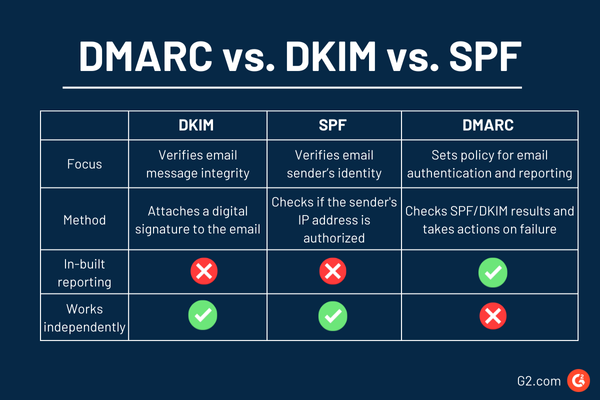
SPF and DKIM existed but:
- Not enforced
- Not aligned with visible sender
- No feedback loop
DMARC introduces policy, alignment, and reporting.
DMARC Architectural Design Flow
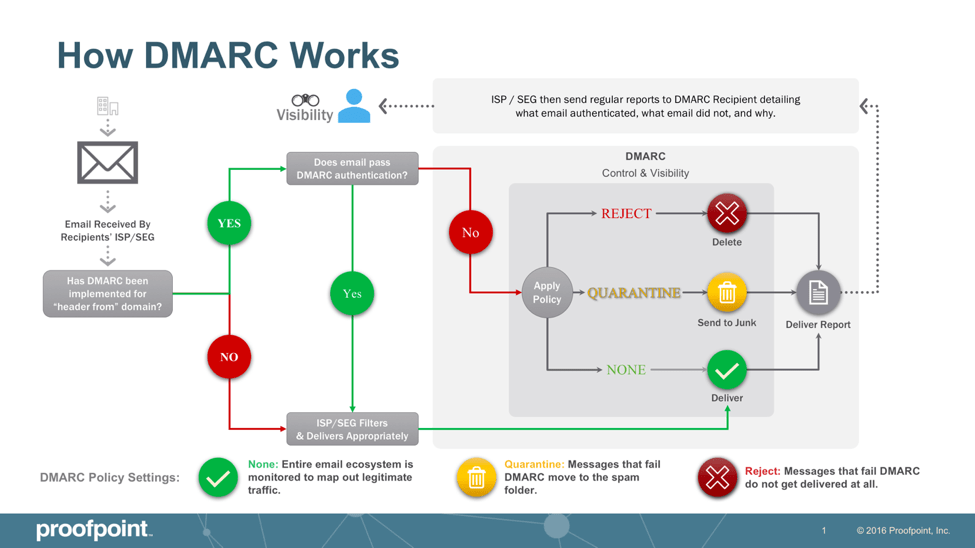
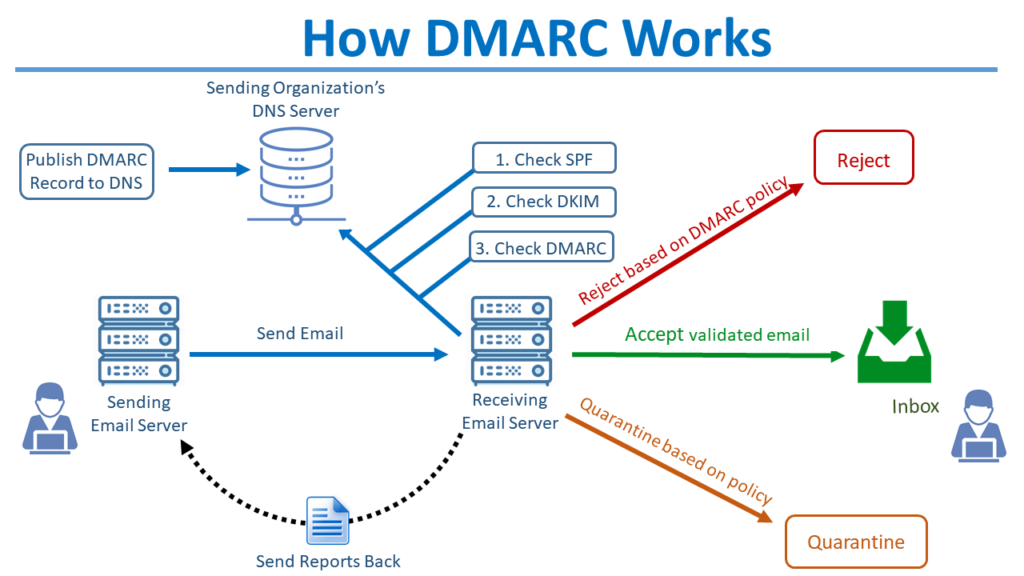
Design Flow
- Receiver evaluates SPF & DKIM
- Checks alignment with From domain
- Applies domain policy:
- none
- quarantine
- reject
- Sends aggregate (RUA) and forensic (RUF) reports
Alignment (Critical for Architects)
- SPF alignment → MAIL FROM aligns with From
- DKIM alignment → d= aligns with From
DMARC Limitations
- Forwarding breaks SPF alignment
- Mailing lists modify content → DKIM fails
- No trust propagation across hops
Use Case
DMARC is your written security policy:
“If email fails checks, block it.”
Real-world
- Stops brand spoofing and CEO fraud emails
ARC (Authenticated Received Chain)
Why ARC Was Introduced
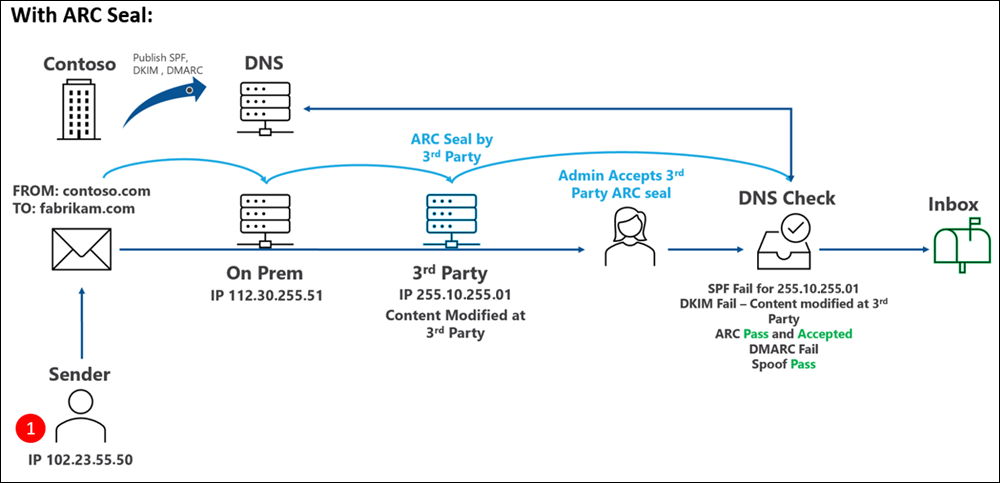
DMARC fails in legitimate multi-hop scenarios:
- Mailing lists
- Forwarders
- Secure email gateways
ARC solves:
“How can downstream receivers trust authentication that already happened upstream?”
ARC Deep Architectural Design
ARC vs DMARC – Architectural Reality
| Scenario | Without ARC | With ARC |
| Forwarded Mail | DMARC Fail | DMARC Context Preserved |
| Mailing Lists | Rejected | Delivered |
| Secure Gateway Rewrite | Fail | Trust-Based Allow |
| BEC Protection | Partial | Context-Aware – ML Engine(LLM) |
Implementing SPF, DKIM, and DMARC
Prerequisites (Non-Negotiable)
Before implementation:
- You own and control the domain (DNS access required)
- You have identified all outbound mail sources, including:
- Microsoft 365 / Google Workspace
- Proofpoint / Mimecast / SEG
- Applications (CRM, ticketing, scanners)
- On-prem SMTP relays
- DNS provider supports:
- TXT records
- 2048-bit DKIM keys
- You understand:
- DNS lookups (recursive resolution)
- SMTP flow (MAIL FROM vs From:)
SPF (Sender Policy Framework)
Purpose (Architectural View)
SPF answers one question only:
Is this sending IP authorized to send mail for this domain?
It validates the MAIL FROM / Return-Path domain, not the visible From address.
Step-by-Step SPF Implementation
Step 1: Inventory All Sending Sources
Create a list of every system that sends mail as your domain.
Example:
- Microsoft 365 →
include:spf.protection.outlook.com - Proofpoint →
include:_spf.pphosted.com - Application server → static IP
203.0.113.10
Step 2: Create the SPF Record (Syntax)
SPF is a single TXT record at the root domain.
Basic Structure
v=spf1 <mechanisms> <qualifier>
Example (Correct)
v=spf1 include:spf.protection.outlook.com include:_spf.pphosted.com ip4:203.0.113.10 -all
Step 3: Understand Each Mechanism (Critical)
| Mechanism | Meaning |
|---|---|
v=spf1 | SPF version identifier (mandatory) |
include: | Import another domain’s SPF |
ip4: / ip6: | Explicitly allowed IP |
-all | Hard fail for everything else |
Step 4: Qualifier Logic (Do Not Guess)
| Qualifier | Result |
|---|---|
+ | Pass (default) |
~ | SoftFail (monitoring) |
- | Fail (enforcement) |
? | Neutral (not recommended) |
Architect Recommendation
- Start with
~all - Move to
-allafter validation
Step 5: DNS Lookup Limit (Hard Constraint)
- Maximum: 10 DNS lookups
- Counted mechanisms:
includeamxexistsredirect
Failure Mode
SPF returns PermError, treated as FAIL by secure gateways.
Step 6: Publish DNS Record
- Host:
@ - Type:
TXT - Value: full SPF string
Step 7: Validate SPF
Validation checks:
- Syntax correctness
- DNS lookup count
- Authorized IP match
SPF Key Limitations (By Design)
- Breaks on forwarding
- Validates infrastructure, not identity
- No message integrity protection
- IP-based trust (cloud-unfriendly)
This is why DKIM exists.
DKIM (DomainKeys Identified Mail)
Purpose (Architectural View)
DKIM answers:
Was this message altered after the sending domain signed it?
It provides cryptographic integrity and domain accountability.
Step-by-Step DKIM Implementation
Step 1: Enable DKIM in Sending Platform
Examples:
- Microsoft 365 → Enable DKIM per domain
- Proofpoint → Generate DKIM key pair
- Postfix →
opendkim-genkey
DKIM Key Components
| Component | Role |
| Private key | Signs the email (never shared) |
| Public key | Published in DNS |
| Selector | Identifies the key |
| d= | Signing domain |
key checker : https://dmarcian.com/dkim-inspector/
Create DKIM DNS Record
DNS Host Format
<selector>._domainkey.example.com
TXT Record Example
v=DKIM1; k=rsa; p=MIIBIjANBgkqhkiG9w0BAQEFAAOCAQ8A...
Rules
- No line breaks
- No quotes inside value
- Use 2048-bit keys (mandatory for security)
Step 4: DKIM Signing Process (Exact Flow)
- Sending MTA hashes headers + body
- Hash encrypted with private key
- DKIM-Signature header added:
DKIM-Signature: v=1; a=rsa-sha256; d=example.com; s=selector1; - Email sent
Step 5: Receiver DKIM Validation
- Extract
d=ands= - Query DNS for public key
- Recompute hash
- Compare signatures
Result
- Pass
- Fail (tampered)
- None (unsigned)
DKIM Failure Scenarios (Common)
| Scenario | Result |
|---|---|
| Footer added by gateway | DKIM fails |
| HTML rewrite | DKIM fails |
| Wrong selector | DKIM none |
| DNS typo | DKIM permerror |
DMARC (Policy, Alignment, Enforcement)
Purpose (Architectural View)
DMARC connects human identity with technical authentication.
It answers:
Does SPF or DKIM pass AND align with the visible From domain?
Step-by-Step DMARC Implementation
Step 1: Understand Alignment (Critical)
| Alignment | Meaning |
|---|---|
| SPF alignment | MAIL FROM domain = From domain |
| DKIM alignment | d= domain = From domain |
Alignment Modes:
r= relaxed (subdomains allowed)s= strict (exact match)
Step 2: Create Initial DMARC Record (Monitor Only)
DNS Host
_dmarc.example.com
TXT Record
v=DMARC1; p=none; rua=mailto:dmarc@yourdomain.com; ruf=mailto:dmarc@yourdomain.com; fo=1; adkim=r; aspf=r;
Field-by-Field Explanation
| Tag | Function |
|---|---|
v | DMARC version |
p | Policy (none/quarantine/reject) |
rua | Aggregate reports |
ruf | Forensic reports |
adkim | DKIM alignment |
aspf | SPF alignment |
fo | Failure options |
Analyze DMARC Reports (Mandatory Phase)
You must review:
- Which systems fail SPF
- Which fail DKIM
- Alignment failures
Duration: 2–4 weeks minimum
Move to Enforcement Gradually
Quarantine
p=quarantine; pct=25
Reject
p=reject; pct=100
Never jump directly to reject.
ARC Was Required
The Structural Problem
Even with perfect SPF, DKIM, and DMARC, email fails authentication when:
- A message is forwarded
- A mailing list modifies headers/body
- A secure email gateway re-signs or rewrites content
- An auto-remediation system (TRAP, ZAP) re-injects mail
Why SPF/DKIM/DMARC Break
| Control | Why It Fails |
|---|---|
| SPF | Forwarder IP not authorized |
| DKIM | Body/header modified |
| DMARC | Alignment fails due to above |
Result
Legitimate email fails DMARC and is quarantined or rejected.
ARC was created to preserve authentication results across hops.
What ARC Actually Does (Precise Definition)
ARC does not authenticate the sender.
ARC authenticates the authentication results of the previous hop.
ARC is a cryptographically sealed chain of custody for email authentication.
ARC Components (Exact Technical Breakdown)
ARC consists of three headers, added per hop.
| Header | Purpose |
|---|---|
| ARC-Seal (AS) | Cryptographic seal of the chain |
| ARC-Message-Signature (AMS) | DKIM-like signature of the message |
| ARC-Authentication-Results (AAR) | Snapshot of SPF/DKIM/DMARC results |
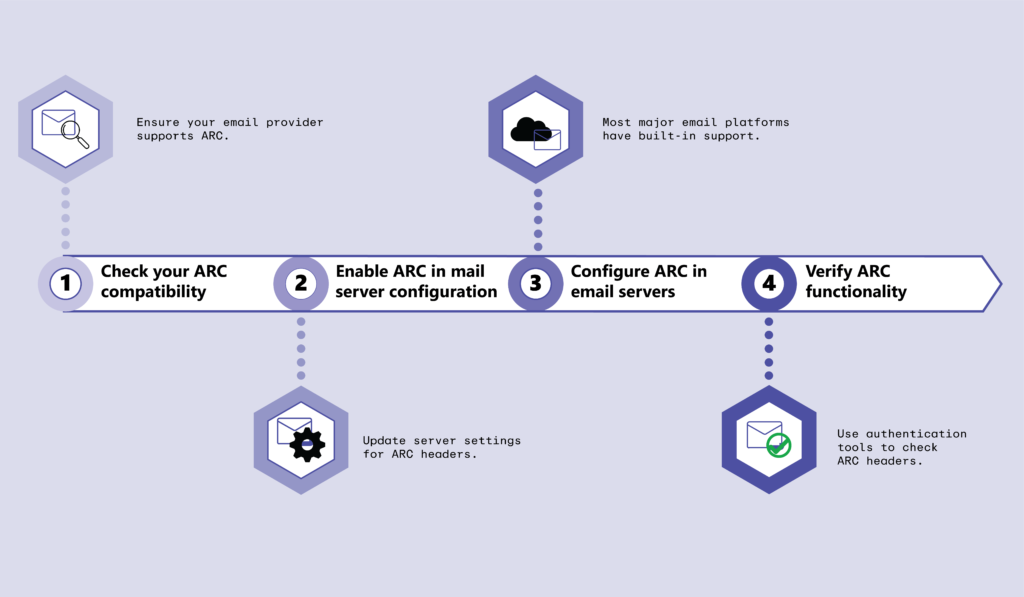
ARC Step-by-Step Implementation
Step 1: Identify ARC-Eligible Systems
ARC should be enabled only on trusted intermediaries:
- Secure Email Gateways
- Email relays
- Mailing list servers
- Cloud security platforms
Do NOT enable ARC on end-user MTAs.
Step 2: Generate ARC Key Pair
ARC uses DKIM-style RSA keys.
Requirements:
- 2048-bit RSA
- Dedicated selector (not DKIM selector reuse)
Step 3: Publish ARC Public Key in DNS
DNS Host Format
selector1._domainkey.example.com
TXT Record
v=DKIM1; k=rsa; p=MIIBIjANBgkqhkiG9w0BAQEFAAOCAQ8A...
ARC reuses DKIM DNS format by design.
Step 4: Enable ARC Signing on Gateway
When email is received:
- Gateway validates SPF, DKIM, DMARC
- Captures results in Authentication-Results
- Writes ARC-Authentication-Results
- Signs message with ARC-Message-Signature
- Seals chain using ARC-Seal (
cv=nonefor first hop)
ARC Header Flow (Concrete Example)
First Hop (cv=none)
ARC-Authentication-Results: i=1; spf=pass; dkim=pass; dmarc=pass
ARC-Message-Signature: i=1; d=relay.example; s=arc1; ...
ARC-Seal: i=1; cv=none; d=relay.example; s=arc1; ...
Second Hop (cv=pass)
ARC-Authentication-Results: i=2; spf=fail; dkim=fail; dmarc=fail
ARC-Message-Signature: i=2; d=forwarder.example; s=arc2; ...
ARC-Seal: i=2; cv=pass; d=forwarder.example; s=arc2; ...
Critical Insight
- SPF/DKIM fail
- ARC validates that earlier hop passed
- Receiver may override DMARC failure
ARC Validation at Receiving MTA
Receiving server performs:
- Validate ARC-Seal chain integrity
- Ensure no break in
i=sequence - Validate cryptographic signatures
- Trust or distrust prior authentication
Decision logic:
- ARC never overrides DMARC
- ARC provides context for local policy
ARC Failure Modes (Architect Reality)
| Issue | Impact |
|---|---|
| Broken ARC chain | ARC ignored |
| Invalid signature | Trust revoked |
| Misconfigured selector | ARC fail |
| Untrusted intermediary | ARC ignored |
Reference articles to follow
Core RFCs (Primary Standards – MUST READ)
1. SPF — RFC 7208 (Definitive SPF Standard)
Use this to master syntax, mechanisms, qualifiers, and DNS limits
Key sections to focus on:
- Section 4: SPF Record Syntax
- Section 5: Evaluation
- Section 10: DNS Lookup Limits (critical)
2. DKIM — RFC 6376
Cryptographic signing, canonicalization, selectors
Key sections:
- Section 3: DKIM-Signature Header
- Section 5: Canonicalization
- Section 6: Signing & Verification
3. DMARC — RFC 7489
Alignment logic, policy enforcement, reporting
Key sections:
- Section 3: Identifier Alignment
- Section 6: Policy Evaluation
- Section 7: Reporting (rua/ruf)
4. ARC — RFC 8617
Authenticated Received Chain (forwarding-safe authentication)
Key sections:
- Section 4: ARC Header Fields
- Section 5: ARC Validation
- Section 7: Security Considerations (very important)
🔹 Government / Research-Grade Whitepapers
5. NIST Technical Note — Email Authentication Mechanisms
Threat modeling + protocol weaknesses
Why this matters:
- Explains why SPF/DKIM/DMARC exist
- Useful for CISO-level justification
6. Academic Research — Email Spoofing & Forwarding Failures
Explains the need for ARC
These are architect-level threat studies, not tutorials.
🔹 Enterprise Deployment (Vendor-Neutral but Practical)
7. Cisco Email Authentication Deployment Guide (PDF)
Enterprise-grade implementation reference
8. Microsoft Defender for Office 365 — Authentication Architecture
Real-world behavior of EOP
Important for understanding:
- DMARC enforcement logic
- ARC validation behavior
EMAIL AUTHENTICATION DEEP-DIVE CHECKLIST
(SPF, DKIM, DMARC, ARC)
Audience: Security Architects, Email Engineers, SOC Analysts
SECTION 1: CORE STANDARDS (READ IN ORDER)
[ ] RFC 7208 – Sender Policy Framework (SPF)
Focus: Syntax, mechanisms, qualifiers, 10-DNS-lookup limit
[ ] RFC 6376 – DomainKeys Identified Mail (DKIM)
Focus: Canonicalization, selectors, key rotation, body/header signing
[ ] RFC 7489 – DMARC
Focus: Alignment logic, policy enforcement, rua/ruf reporting
[ ] RFC 8617 – ARC
Focus: ARC-Seal, ARC-Message-Signature, ARC trust model
SECTION 2: ARCHITECTURAL WEAKNESSES
[ ] SPF failure during forwarding
[ ] DKIM body mutation scenarios
[ ] DMARC alignment breakages
[ ] ARC chain validation and trust scoring
SECTION 3: OPERATIONAL DEPLOYMENT
[ ] Inventory all sending sources
[ ] Validate SPF lookup count
[ ] Enforce 2048-bit DKIM keys
[ ] Monitor DMARC aggregate reports (30 days)
[ ] Gradual policy enforcement (none → quarantine → reject)
[ ] ARC enabled only on trusted gateways
SECTION 4: SOC & THREAT DETECTION
[ ] DMARC failure correlation with phishing
[ ] BEC scenarios bypassing SPF/DKIM
[ ] ARC-assisted DMARC override cases
[ ] Email header forensic analysis workflow
SECTION 5: ENTERPRISE CONTEXT
[ ] Microsoft EOP behavior
[ ] Proofpoint ARC handling
[ ] Google Workspace forwarding trust
STATUS: COMPLETE / IN PROGRESS